 Azimut AI
Almost no company knows how much it spends on AI today. It isn't carelessness: spend comes in through three different doors and none of them goes through the same budget. According to Microsoft and LinkedIn's 2024 Work Trend Index, 78% of people who use AI at work bring their own tools, without the company having chosen them. This guide breaks the problem into six steps you can complete in a quarter, with no special tools.
Why AI spend gets out of control
- Personal licenses. ChatGPT, Claude or Gemini plans that each person pays for with a card and expenses, or pays out of pocket. They're hard to see and usually sit on plans that aren't designed for company data.
- AI built into software you already pay for. Microsoft 365, Google Workspace, the CRM or the support tool come with AI features, some included and some as add-ons. You pay for them even if nobody uses them.
- Usage-based consumption. API calls, agents billed per run, extra credits. It's the line that grows fastest and the only one that can spike in a month.
Step 1. Take inventory
The first goal isn't saving, it's seeing. You can gather the essentials in two weeks:
| Where to look | What to look for |
|---|---|
| Company cards and expense reports | Charges from OpenAI, Anthropic, Google, Microsoft, Perplexity, Midjourney and the like. |
| Software invoices | AI add-ons on licenses you already have: Copilot, Gemini, CRM or support assistants. |
| Cloud and API consoles | Model consumption by project, even if only one team signed up. |
| A five-question survey | Who uses AI, with which tool, on which plan, who pays and for which tasks. |
The result is a sheet with three columns: tool, monthly cost and people using it. It almost always turns up duplicates, licenses held by people who no longer use them and the odd personal plan with customer data inside.
Step 2. Choose the pricing model on purpose
Providers charge in three ways, and each spreads the risk differently:
| Model | How it works | For | Against |
|---|---|---|---|
| Per seat | Fixed price per person per month. | Predictable budget. | You pay the same for non-users, and usage is invisible. |
| Per consumption | You pay for what gets processed. | Light users cost little. | Cost is hard to forecast and can spike. |
| Seat with consumption included | Fixed price with a usage allowance per person. | Predictable, with usage in plain sight. | You need to watch who approaches their allowance. |
In practice the big providers mix models: Microsoft 365 Copilot charges a seat and bills some agent features separately by consumption; Claude Enterprise charges a seat plus usage at API rates; ChatGPT Business charges fixed seats with a premium seat for heavy users. What matters is knowing which part of your bill is fixed and which can grow. Dated prices are in what each AI costs a company.
Step 3. Allocate by person and team
Not everyone needs the same thing. A rule that works: a standard seat for everyone who works at a screen, and a higher-capacity seat only for those whose consumption shows they need it, not for those who ask. Assigning higher-capacity seats by job title rather than by usage is the most common way to overpay.
Step 4. Measure consumption and adoption
Five metrics are enough to govern spend, and all of them can be pulled every month:
- Active people over paid seats. If 87 of 100 seats are used, you know how much you pay for nothing.
- Cost per active person. Monthly spend divided by actual users. With 100 seats at €29 and 87 active people, that's €33.33 per active person, not €29.
- Consumption by team. Where usage concentrates and which teams haven't started yet.
- Consumption by model. How much spend goes to the most expensive model and for which tasks.
- Most-used agents and tools. What work is being done with AI, which is what you later compare against the starting point.
These metrics measure cost and usage, not value. Value is measured separately, by comparing how each team worked before and after, and it's worth not confusing the two.
Step 5. Use the right model for each task
The same work can cost several times more depending on the model. In our cost estimates, at the same usage volume, always choosing the cheapest models in the catalog versus the most expensive changes inference cost by a factor of four. Summarizing a meeting doesn't need the most powerful model; reviewing a long contract might. Two simple measures: set a balanced default model for everyday work and reserve the most capable models for the agents and tasks that justify them.
Step 6. Set limits and alerts
- Spend limits per person and per organization on plans that support them.
- Alerts at 80% of the allowance or the month's budget.
- Prior approval to turn on features billed by consumption, such as agents working with company data.
- A clear policy on personal plans: what can be used, with which data and who pays.
Banning without offering an alternative doesn't work: usage goes into the shadows and the spend still exists, just out of sight.
The quarterly review
Every three months, a half-hour meeting with these questions: how many seats go unused and can be reassigned? Who consistently exhausts their allowance and needs more capacity? Which teams haven't started, and why? What share of spend goes to the most expensive model, and is it justified? Have new licenses appeared outside the inventory? With the inventory from step 1 and the metrics from step 4, that meeting takes an afternoon to prepare.
How Azimut handles it
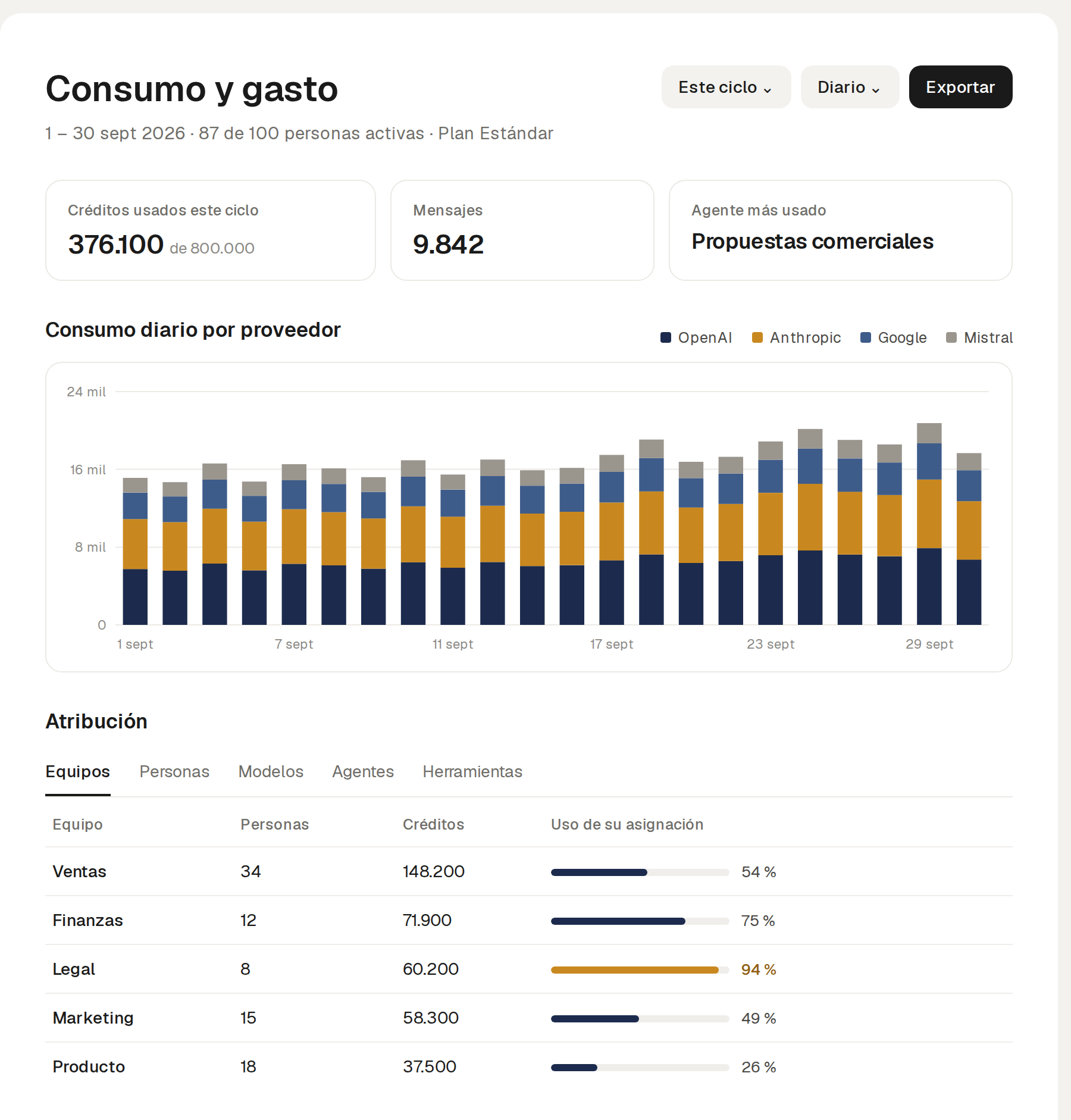
Azimut charges a fixed price per seat billed annually, €29 a month on the Standard plan, with a monthly allowance of 8,000 credits per person, and doesn't bill variable consumption. The consumption dashboard shows where credits go by person, team, model, agent and tool, and each team can use whichever OpenAI, Anthropic, Google or Mistral model best fits each task. Teams approaching their allowance show up before they run short.
Sources: Microsoft and LinkedIn, 2024 Work Trend Index (May 2024, global survey); provider prices checked on their official pages for Spain on October 6, 2026; Azimut's inference cost estimate at the same usage volume with a different model mix.
Frequently asked questions
How much does AI cost per employee in a company?
On business plans billed annually, roughly €15 to €30 per person per month in Spain, depending on the provider and plan, plus consumption billed separately in some cases. Real cost is measured per active person, not per paid license.
Is it better to pay per seat or per consumption?
Per seat gives a predictable budget but hides usage; per consumption matches cost to usage but is hard to forecast. A seat with a consumption allowance included combines the predictability of the first with the visibility of the second.
How do I find AI spend I can't see?
Review company cards and expense reports, software invoices with AI add-ons and cloud consoles, and ask the workforce in a short survey which tools they use and who pays for them.
Which metrics should I track?
Active people over paid seats, cost per active person, consumption by team, consumption by model, and the most-used agents or tools. They measure cost and usage; value is measured separately, against the starting point.
Should I ban personal AI plans?
Banning without an alternative pushes usage into the shadows. It's better to offer a suitable company tool and a clear policy on which data can be used in each tool.